Winomania App and Mobile Casino UK: iPhone and Android Guide
 Available in GB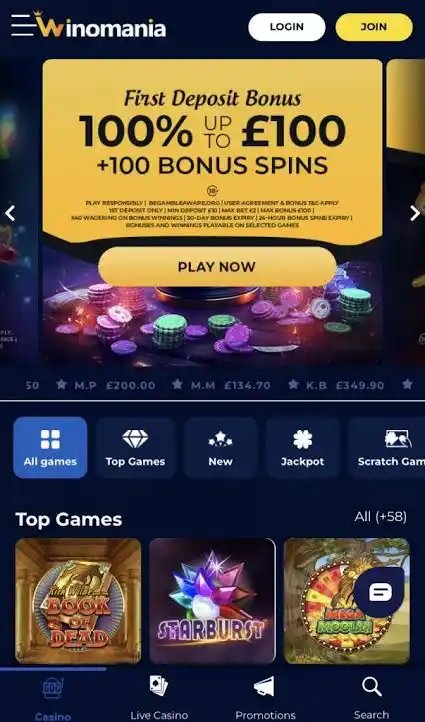
Winomania does not currently have a verified dedicated iOS or Android casino app. The actual mobile product is the browser-based casino: Winomania’s UK-facing page says there is no need to download an application and instructs players to log in through the website on a phone or computer. That means iPhone and Android users can access Winomania through a mobile browser without installing a native casino app. Slots and live casino are verified parts of the Winomania game offering, so mobile use is primarily about browser access rather than finding an App Store or Google Play download.
Table of Contents
- Is there a Winomania app for iPhone or Android?
- No app does not mean no mobile casino
- How to use Winomania on an iPhone
- How to use Winomania on Android
- What can you do from the mobile site?
- Browser access versus a native casino app
- Mobile games: what is verified and what is not
- Mobile account and payment access
- Security checks for mobile access
- Who is the browser model best for?
- Using Winomania on mobile without a native app
- Recommend
Is there a Winomania app for iPhone or Android?
No dedicated Winomania casino app is currently verified for either iOS or Android. Current independent reviews agree on that point, and Winomania’s own UK-facing page directs users to the website instead of an application download. This distinction matters because search results can contain similarly named casino apps or unofficial pages that use “app” loosely to describe mobile access.
For a UK player, the straightforward route is to open the official Winomania website in a modern phone browser and use the account there. Do not install a file simply because a third-party page labels it a Winomania APK. Browser play is the confirmed route; no native Android package or App Store listing is confirmed.
No app does not mean no mobile casino
A native app is only one way to deliver a mobile gambling product. Winomania uses the browser route instead. The site states that no applications need to be downloaded and that users can log in through the website by phone or computer. That gives mobile access without using device storage for a dedicated casino app or waiting for app-store updates.
| Expectation | Winomania reality | Practical effect |
|---|---|---|
| Dedicated iPhone app | No verified native iOS casino app | Use Safari or another supported browser |
| Dedicated Android app | No verified native Android casino app | Use Chrome or another supported browser |
| Casino access on phone | Verified browser access | No casino-app installation is required |
| Games on mobile | Slots and live casino are verified product categories | Use the mobile site to reach the game lobby |
This is the key answer to app-search intent: the browser site is not a fallback after a missing app; it is the current mobile access model.
How to use Winomania on an iPhone
On an iPhone, open the official Winomania website in the browser and sign in through the web interface. Because no dedicated iOS casino app is verified, you should not expect an App Store installation step as part of the normal account journey. The same account concept applies across desktop and mobile web access: the browser is simply another way to reach the service.
If you prefer quicker access, your phone’s browser may let you save a website shortcut to the home screen. That shortcut should be understood as a link to the web service rather than proof of a native Winomania app. Keeping that distinction clear helps avoid confusing a browser icon with an App Store product.
How to use Winomania on Android
Android users can likewise open the official website in a mobile browser. The verified Winomania information does not require an application download. Current independent sources also describe the UK product as browser-based rather than a dedicated Android casino app.
That makes third-party APK claims worth treating carefully. An unofficial download page can call a browser shortcut or unrelated package an “app” without establishing that Winomania itself publishes it. Use the official mobile website instead of installing software from an unknown source.
What can you do from the mobile site?
Winomania’s verified product set includes online slots and a live casino section, while its own mobile wording says users can log in through the website from a phone. That is enough to establish the core mobile proposition without claiming untested performance figures. The mobile game library remains the better guide for categories and providers, and the live casino on mobile covers live-dealer play in more detail.
Account access is also part of the browser journey. Registration and verification are covered separately in the account setup section. Core casino access does not depend on a native app installation.
Browser access versus a native casino app
For some users, “app” is shorthand for convenient phone access. In that sense, a browser-based casino can satisfy most of the access need even without a downloadable package. The trade-off is mainly about delivery rather than whether the casino can be reached.
| Browser-based access | Native-app expectation |
|---|---|
| No casino app installation required | Dedicated icon and app-store distribution |
| Uses the current website version | App updates may be distributed separately |
| Works through a browser session | May support device-specific app features |
| Less risk of confusing an unofficial download with the operator | Requires verifying that the store listing is genuine |
Winomania’s current model sits in the left-hand column. Loading speed, data consumption and frame rates vary by device, connection and game, so they should be judged on the device and network you actually use.
Mobile games: what is verified and what is not
Winomania offers online slots and a live casino section, and its official UK-facing page explicitly says users can access the website on a phone. Those facts support mobile casino use at a high level. They do not justify claiming that every individual game behaves identically on every handset, browser version or network.
If a specific title matters to you, check it from the current mobile lobby before committing significant time or money. Games can have different screen layouts, orientation preferences and streaming demands. For live casino in particular, the quality of the network connection can matter more than whether access starts from an app icon or a browser tab.
Mobile account and payment access
The official mobile instruction is simply to log in through the website, so mobile access is tied to the same Winomania account rather than a separate app account. From a decision-making perspective, that is useful because there is no second casino identity to manage merely for phone use.
For deposits and withdrawals, use the current account interface and the routes shown for your account. Payment methods are an account-level feature; the phone browser is the access layer, so there is no separate mobile-only payment list.
Security checks for mobile access
The absence of a native app changes what you should verify before logging in. The most important step is to reach the genuine Winomania website rather than a lookalike download page. Avoid treating a third-party “download app” button as official merely because it uses the brand name or an app-style icon.
On a shared or borrowed phone, do not save credentials. On your own device, keep the operating system and browser updated and use normal device security. These habits are especially relevant to browser-based access and are safer than hunting for an unverified APK.
Who is the browser model best for?
The browser model suits players who want to move between desktop and phone without installing a separate casino package. It is also straightforward for occasional mobile use because access starts from a URL rather than an app-store search. If your main requirement is a dedicated native application with app-specific features, Winomania currently does not match that preference.
The better question is therefore not “where do I download the app?” but “does browser access cover the way I want to play?” For most informational comparisons, that means checking the mobile lobby, the game categories you use and the account functions you need, rather than scoring the site down solely for lacking a store download.
Using Winomania on mobile without a native app
Winomania’s mobile casino is accessed through the website, with no verified dedicated iOS or Android casino app. The operator says no application download is required, and the verified product includes both slots and live casino. For UK users, that makes Safari or Chrome-style browser access the normal mobile route.
Use the official website rather than an unofficial APK or similarly named app-store product, and judge mobile suitability by the functions you actually need. If browser access, the games catalogue and your normal account setup cover those needs, the lack of a native Winomania app is mostly a distribution choice rather than a lack of mobile access.
For a broader casino assessment, see the Winomania review.